 Cool-chic
Decoder configuration#
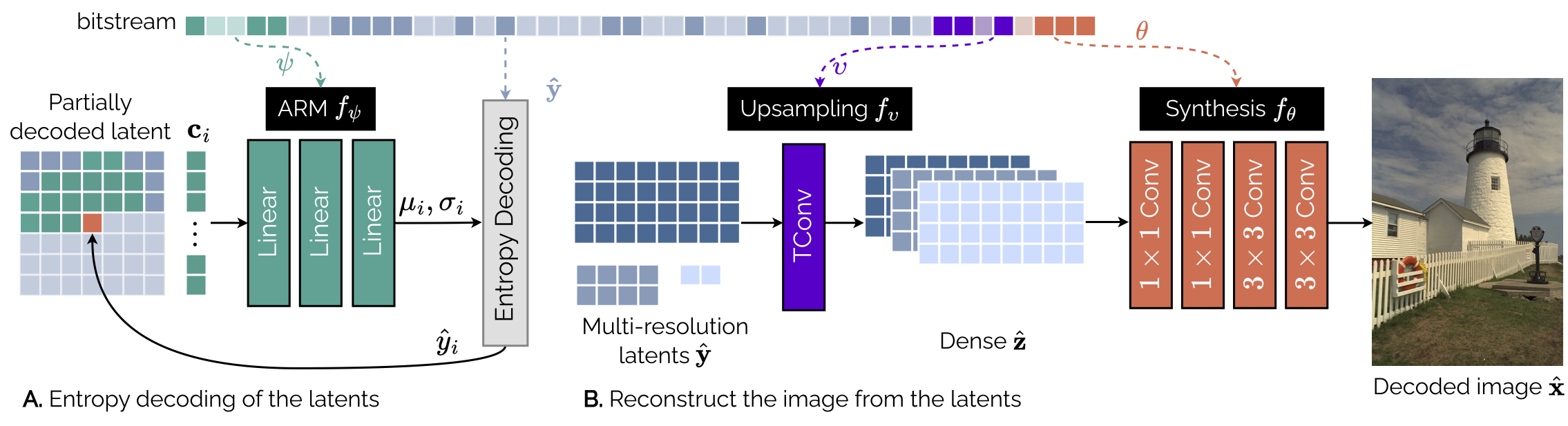
This section details how to change the architecture of the Cool-chic decoder.
The decoder settings of Cool-chic are set in a configuration file. Examples of
such configuration files are located in cfg/dec/intra. They include the following
parameters:
Parameter |
Role |
Example value |
|---|---|---|
|
Maximal and minimal resolution of the latent grids. |
|
|
Maximal and minimal resolution of the hyperlatent grids. |
|
|
ARM architecture |
|
|
Number of context exctracted by the IFCE |
|
|
Maximal and minimal resolution of latent using the IFCE |
|
|
Synthesis architecture |
|
|
Upsampling filter size |
|
|
Pre-concatenation upsampling filter size |
|
Tip
Each parameter listed in the configuration file can be overridden through a command line argument:
(venv) ~/Cool-Chic$ python cc_encode.py \
  --dec_cfg_residue=cfg/dec/intra/lop.cfg # lop.cfg has dim_arm=8,2
  --arm_residue=16,2                      # This override the value present in lop.cfg
Some existing configuration files#
Some configuration files are proposed in cfg/dec/intra/:
Name |
Description |
Multiplication / decoded pixel |
|---|---|---|
|
Low Operating Point |
500 |
|
Medium Operating Point |
1000 |
|
High Operating Point |
2000 |
|
Very High Operating Point |
3000 |
The Cool-chic 5.0: paper presents the performance of these different decoder configurations.
Tip
A good deal of useful info are logged inside the working directory specified when encoding an image or video.
(venv) ~/Cool-Chic$ python cc_encode.py   \
  --input=path_to_my_example                    \
  --output=bitstream.cool                       \
  --workdir=./my_temporary_workdir/
The file ./my_temporary_workdir/XXXX-archi.txt contains the
detailed Cool-chic architecture, number of parameters and number of
multiplications.
Latent dimension --latent_resolution_residue#
Most of the information about the frame to decode is stored inside a set of hierarchical latent grids. This is parameterized by indicating the number of features for each resolution separated by comas.
Using a 512x768 image from the Kodak dataset as an example gives the
following latent dimensions
(venv) ~/Cool-Chic$ python cc_encode.py --input=kodim01.png --latent_resolution_residue=0-3

cat ./0000-archi.txt

| module                                  | #parameters or shape   | #flops   |
|:----------------------------------------|:-----------------------|:---------|
| model                                   |                        |          |
|  latent_grids                           |                        |          |
|   latent_grids.0                        |   (1, 1, 512, 768)     |          |
|   latent_grids.1                        |   (1, 1, 256, 384)     |          |
|   latent_grids.2                        |   (1, 1, 128, 192)     |          |
|   latent_grids.3                        |   (1, 1, 64, 96)       |          |
Tip
Use --latent_resolution_residue=auto to automatically change the number of
latent grids depending on the image size.
Attention
If there is no higher resolution latent e.g.
--latent_resolution_residue=2-3 the upsampling stops at the highest
latent resolution (here 1/4). Then, the dense representation goes to the
synthesis and the output is still at the highest latent resolution (e.g.
1/4). In that case, a final upsampling is performed to get to the desired
full resolution.
Hyperlatent dimension --hyperlatent_resolution_residue#
Hyperlatent grids are parameterized similarly to the main latent grids.
Using a 512x768 image from the Kodak dataset as an example gives the
following latent dimensions
(venv) ~/Cool-Chic$ python cc_encode.py --input=kodim01.png --latent_resolution_residue=0-1 --hyperlatent_resolution_residue=2-3

cat ./0000-archi.txt

| module                                  | #parameters or shape   | #flops   |
|:----------------------------------------|:-----------------------|:---------|
| model                                   |                        |          |
|  latent_grids                           |                        |          |
|   latent_grids.0                        |   (1, 1, 512, 768)     |          |   # Main latent grids
|   latent_grids.1                        |   (1, 1, 256, 384)     |          |   # Main latent grids
|   latent_grids.2                        |   (1, 1, 128, 192)     |          |   # Hyperlatent grids
|   latent_grids.3                        |   (1, 1, 64, 96)       |          |   # Hyperlatent grids
Tip
Use --hyperlatent_resolution_residue=auto to automatically change the number of
hyperlatent grids depending on the image size.
Autoregressive module (ARM) --arm_residue#
The autoregressive probability module (ARM) predict the distribution of a given
latent pixel given its neighboring pixels, driving the entropy coder. It is
tuned by a single parameter --arm_residue=<X>,<Y>/stabiliser serving two purposes:
The first number
Xrepresents both the number of spatial context pixels and the number of hidden features for all hidden layers.The second number
Ysets the number of hidden layer(s). Setting it to 0 gives a single-layer linear ARM.Use
/stabiliserto enable the linear stabiliser residual layer around the ARM.
Note
The ARM always has the same number of output features: 2. One is for the expectation \(\mu\) and the other is a re-parameterization of the Laplace scale \(4 + \ln b\).
Attention
Due to implementation constraints, we impose the following restrictions on the ARM architecture:
All layers except the output one are residual followed with a ReLU activation
Inter-Feature Context Extractor (IFCE)#
IFCE are linear layers dedicated to individual latent grids, used to extract
context vectors from already decoded latent grids. Use
--output_feature_ifce_residue to specify the dimension of these context
vectors. Use ifce_resolution_residue to specify the resolution of the latent
benefiting from the IFCE.
Upsampling#
The upsampling network takes the set of hierarchical latent variables and
upsample them to obtain a dense latent representation with the same resolution
than the image to decode e.g. [C, H, W] for a H, W image. This is
achieved through successive upsampling of the latent using 2d convolutions. The
size of these convolutive filters are parameterized with --ups_k_size_residue and
--ups_preconcat_k_size_residue.
See the upsampling doc for more details.
Synthesis#
The synthesis transform is a convolutive network mapping the dense latent input
[C, H, W] to a X, H, W output. The number of output feature X depends
on the type of frame:
I (intra) frames have
X = 3output channels e.g. RGB or YUV. This is the case for still image compression.
The synthesis is tuned by a single parameter
--layers_synthesis_residue=<layer1>,<layer2>/stabiliser which describes all layers, separated
by comas. Each layer is decomposed as follows:
<output_dim>-<kernel_size>-<type>-<non_linearity>
output_dimis the number of output features. Set the last layer(s) toXto be automatically replaced by the appropriate value according to the frame type.kernel_sizeis the size of the convolution kerneltypeis eitherlinear(normal convolution) orresidual(convolution + skip connection)non_linearitycan bereluornone
Note
The number of input features for each layer is automatically inferred from the previous one or from the number of latent features.
Use /stabiliser to enable the linear stabiliser residual layer around the ARM.